The Social Security System of the Philippines, or SSS, offers social insurance to private, public, professional, and informal sectors. Members pay a monthly contribution to this government agency, and SSS uses it to provide benefits like retirement pensions and salary loans.
At this point, you may be wondering how much you’re giving to SSS. That said, we’ve made this guide to help you compute your SSS monthly contribution. Let’s look at what this benefit is all about and how you can calculate it properly.

Who Can Contribute to the SSS Fund?
Whether you’re working in the private sector or classified as an individual member, SSS will provide the necessary coverage. The agency offers compulsory and voluntary coverage to its members.
If you fall under any of the classifications seen below, you’re entitled to compulsory SSS coverage.
- Business or household employer
- Employee
- Self-employed individual
- Househelper or kasambahay
- Land and sea-based overseas Filipino workers, except for Filipino-born permanent migrants such as immigrants, permanent residents, and naturalized citizens of other countries.
Meanwhile, you’ll get voluntary SSS coverage if you’re a non-working spouse or separated member (an SSS member who no longer works for an employer). Filipinos who are naturalized citizens of foreign countries can be voluntary members, as well.
Do keep in mind, though, that you must have paid contributions as an employed, self-employed, or overseas Filipino worker (OFW) member for at least a month so you can remit payments voluntarily. You won’t be able to pay your monthly contribution if you fail to meet this requirement. More importantly, you can remit your contribution after parting ways with your employer (and getting your final pay).
How Much is My SSS Contribution?
For 2021, SSS set its contribution rate at 13% of the monthly salary credit (MSC) that’s up to ₱25,000. Employers and employees share the current rate where 8.5% of contributions come from employers, and employees give 4.5% worth of contributions to SSS.
How Do I Compute My SSS Contribution?
SSS monthly contribution computations for employers, employees, and self-employed individuals vary. If you fall under any of these categories, here’s how you can calculate your SSS contribution.
For Employers & Employees
To ensure a proper computation, you can use the SSS contribution table for employers and employees below.
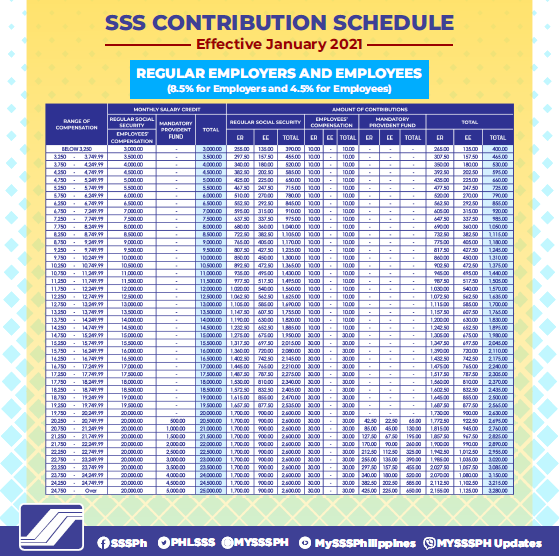
Image from SSS
Now, let’s take a look at how you should compute employee contributions.
- Find the corresponding salary bracket for your monthly income on the “Range of Compensation” column, then get the equivalent MSC from the “Total” column.
- After identifying your income bracket and MSC, follow these steps:
- For employers: Go to the ER column and get your share of the contribution that matches an employee’s MSC.
- For employees: Get your monthly deduction from the EE column. Make sure that the amount matches your MSC.
Example: Employee A’s income falls under the ₱14,750 to ₱15,249.99 bracket, so their MSC is ₱15,000. Their employer will pay a share of ₱1,275 and deduct ₱675 from Employee A’s salary.
- Get the total monthly contribution from the rightmost column. Using our sample MSC, Employee A should contribute ₱1,980 per month.

You can also calculate your SSS contribution with the following formula:
MSC x Contribution Rate = Total Monthly Contribution
If we compute for the total monthly contribution using the formula above, we’ll get:
₱15,000 x 4.5% (employee’s share) = ₱675 OR ₱15,000 x 0.045 = ₱675
₱15,000 x 8.5% (employer’s share) = ₱1,275 OR ₱15,000 x 0.085 = ₱1,275
Also, SSS adds a specific amount of Employees’ Compensation (EC) contribution to an employer’s share. So if the employer remits ₱1,275 for monthly contributions, ₱30 will be added to that amount. We can compute their total share like this:
₱1,275 (employer’s share) + ₱30 (EC contribution) = ₱1,305
Then, add the employee’s monthly deduction and the employer’s total share of contribution to get your total monthly contribution. Your computation should look like this:
₱675 + ₱1,305 = ₱1,980
For Self-Employed Members
If you want to know how much you’re contributing as a self-employed individual, the table below can help you get the right amount.
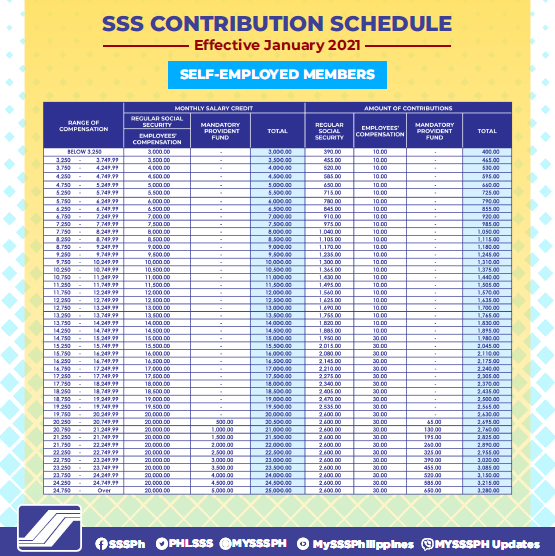
Image from SSS
You can calculate your monthly contribution as a self-employed individual by following these steps:
- Look for your monthly income bracket on the Range of Compensation column.
- Go to the rightmost column of the Monthly Salary Credit section, then get your corresponding MSC.
- Use this formula to compute your monthly contribution: MSC x Contribution Rate = Monthly Contribution Amount
Example: Let’s say your income falls between ₱19,750 to ₱20,249.99. ₱20,000 is the MSC for self-employed individuals under that bracket. Then, multiply the MSC by the current SSS contribution rate, as shown below:
₱20,000 x 13% = ₱2,600 OR ₱20,000 x 0.13 = ₱2,600
But the computation doesn’t end there. If you’ve joined the agency’s EC program, you can pay an extra ₱10 if your MSC is below ₱15,000, or ₱30 for an MSC amount of ₱15,000 and above. Just take note that you’ll have to remit your EC contributions yourself.
Now, let’s take our sample monthly contribution amount and add it to its corresponding EC contribution. Here’s how we calculated the final contribution amount:
₱2,600 + ₱30 = ₱2,630
When Should I Pay My SSS Contribution?
SSS previously set contribution payment deadlines based on the last digit of an employer or member’s SSS number. But for 2021, the agency is encouraging members to submit payments on the last day of the next month or quarter. Your SSS membership will determine when you need to remit your contributions.
If you’re a regular employer, payments are due on the last day of the next month. And if you’re self-employed, you must pay on the last day of the following month or quarter.

Streamline Your SSS Contribution Calculations
Company growth and salary adjustments can make SSS contributions tricky to compute. By streamlining the way you calculate, you can reduce errors and boost your credibility. With Sprout’s top-notch benefits platform, you can make the computation process hassle-free, so you focus on achieving your business goals.
Give your employees the benefits they deserve with our all-in-one holistic platform. Book a demo today or visit the Sprout blog for more HR-related tips and insights.
About the Author